








Linking LinkedIn Ads as a source
Contents
You can sync data from LinkedIn Ads reports by configuring it as a source in PostHog. The supported reports that can be synced include Account, Campaigns, Campaign Stats, Campaign Groups and Campaign Groups Stats, as described here:
- Accounts
- Campaigns
- Campaign Groups
- Campaign Stats: Ad analytics by CAMPAIGN
- Campaign Group Stats: Ad analytics by CAMPAIGN_GROUP
Additional reports will be added based on user feedback we receive via our in-app support form.
Requirements
- A LinkedIn Ads account with permission to access data from accounts you want to sync.
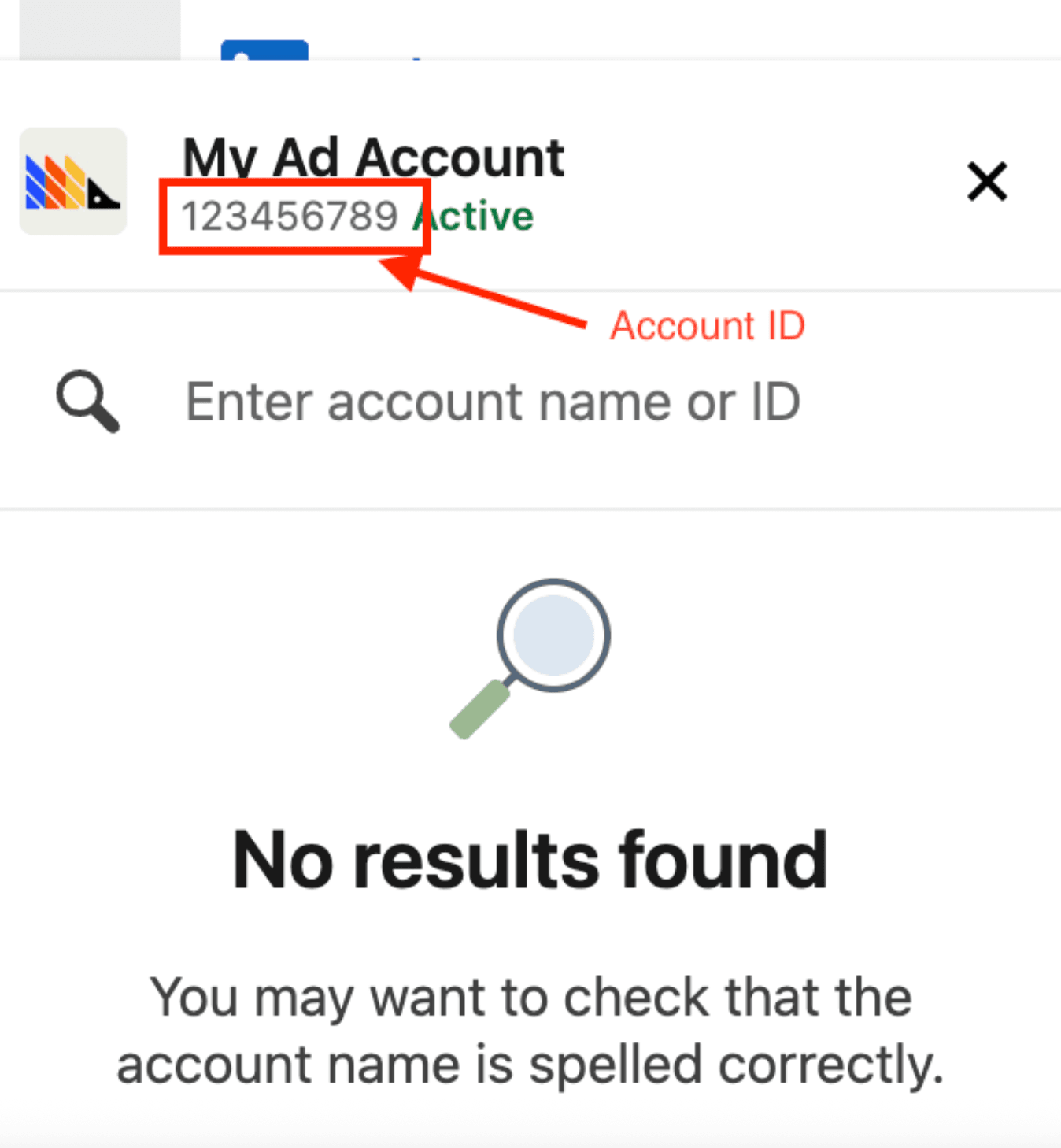
- Your account ID from the campaign manager (see how in the image below, it can also be taken from the URL like
https://www.linkedin.com/campaignmanager/accounts/(ID here)/overview?businessId=personal)
Configuring PostHog
Connect PostHog to your LinkedIn Ads account using a LinkedIn account. The LinkedIn account must have permission to access data.
- In PostHog, go to the Data pipelines tab.
- Open the + New drop-down menu in the top-right and select Source.
- Find LinkedIn Ads in the sources list and click Link.
- Enter the Account ID of the LinkedIn Ads account you want to sync.
- Select an existing LinkedIn Ads account, or create a new integration
- (Optional) Add a prefix for the table name.
Configuration
| Option | Type | Required |
|---|---|---|
Account ID | text | Yes |
LinkedIn Ads account | oauth | Yes |
Supported tables
| Table | Description | Sync method | Incremental field | Primary key |
|---|---|---|---|---|
accounts | A LinkedIn advertising account (ad account) used to run and bill campaigns. | Full refresh | — | — |
campaigns | A LinkedIn ad campaign — a budget, schedule, and targeting wrapper around creatives. | Full refresh | — | — |
campaign_groups | A group of LinkedIn ad campaigns sharing a budget and schedule. | Full refresh | — | — |
creatives | A LinkedIn ad creative — the content shown to members within a campaign. | Full refresh | — | — |
campaign_stats | Daily performance analytics for LinkedIn ad campaigns, pivoted by campaign. | Incremental, Full refresh | date_start | — |
campaign_group_stats | Daily performance analytics for LinkedIn ad campaign groups, pivoted by campaign group. | Incremental, Full refresh | date_start | — |
creative_stats | Daily performance analytics for LinkedIn ad creatives, pivoted by creative. | Incremental, Full refresh | date_start | — |
Troubleshooting
Account not found
If your sync fails with the error "LinkedIn could not find the configured ad account", it means LinkedIn returned a RESOURCE_NOT_FOUND response. This happens when:
- The Account ID in your source settings is incorrect or doesn't exist.
- PostHog no longer has access to the LinkedIn ad account.
To resolve this:
- Verify the Account ID is the correct numeric ID from your LinkedIn Campaign Manager.
- Confirm PostHog still has access to the ad account by re-authorizing the LinkedIn Ads integration.
- Re-sync the source.
Invalid Account ID format
If your sync fails with the error "The LinkedIn Ads Account ID is invalid", it means the Account ID you entered is not in the correct format. This happens when:
- You entered a LinkedIn URL instead of the numeric ID.
- You entered a company name or other text instead of the numeric ID.
- The value contains extra whitespace or special characters.
To resolve this:
- Go to your LinkedIn Campaign Manager.
- Find your numeric Account ID – it appears in the URL (e.g.,
https://www.linkedin.com/campaignmanager/accounts/123456789/overview) or in the account dropdown. - Update your PostHog source configuration with the numeric ID only (e.g.,
123456789). - Re-sync the source.
Restricted member account
If your sync fails with an error mentioning RESTRICTED_MEMBER or "Member is restricted", it means LinkedIn has restricted the account that authorized this integration. This is a LinkedIn-side restriction (such as a suspended or flagged account) that prevents PostHog from accessing your ad data. Retrying won't help until the restriction is lifted.
To resolve this:
- Contact LinkedIn to resolve the account restriction.
- Once the restriction is lifted, re-authorize the LinkedIn Ads integration in PostHog.
- Re-sync the source.