








Linking Bing Ads as a source
Contents
You can sync data from Bing Ads reports by configuring it as a source in PostHog. These are the supported entity and reports:
| Report Type | Description |
|---|---|
| Campaigns | |
| Campaign Performance Report | Performance metrics at the campaign level |
| Ad Group Performance Report | Performance metrics at the ad group level |
| Ad Performance Report | Performance metrics at the ad level |
Microsoft Advertising only retains daily-aggregated performance report data for 36 months. When syncing performance reports (Campaign Performance Report, Ad Group Performance Report, Ad Performance Report), PostHog automatically limits the historical data sync to this 36-month window.
This doesn't affect the Campaigns entity, which syncs all available data.
See Microsoft's data retention documentation for details.
Additional reports will be added based on user feedback we receive via our in-app support form.
Requirements
- A Bing Ads account with permission to access data from accounts you want to sync.
- Your Account ID (numeric only) from the Bing Ads interface > Settings > Account Settings > The account ID is visible below the Account ID header.
Microsoft Advertising shows both an Account Number and an Account ID in the UI:
- Account Number - An eight-character alphanumeric value (e.g.,
A1B2C3D4). This is NOT what you need. - Account ID - A numeric-only value (e.g.,
123456789). This is what PostHog requires.
Make sure you enter the numeric Account ID, not the alphanumeric Account Number.
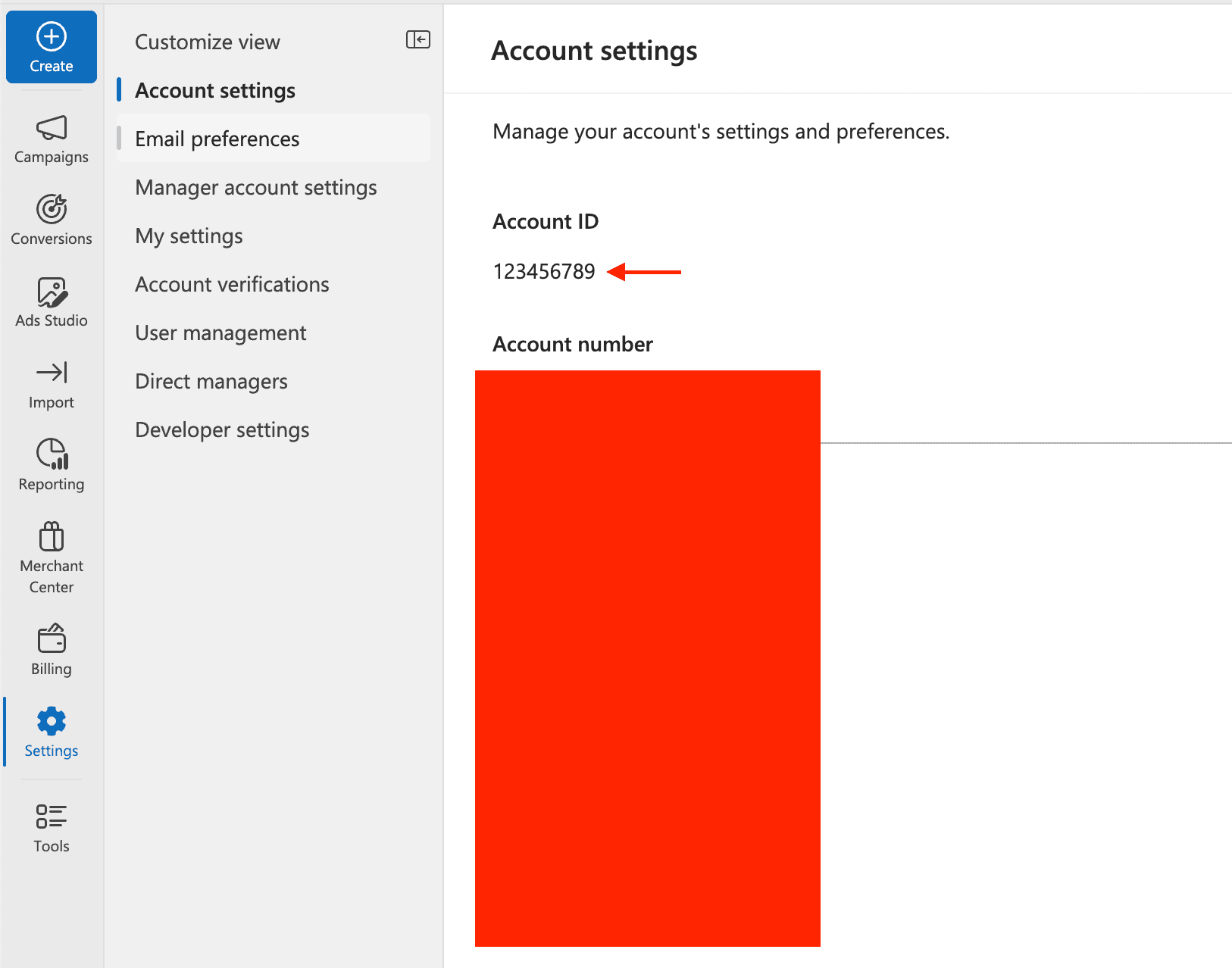
Microsoft Advertising has two different identifiers:
- Account Number - An alphanumeric, 8-character value (e.g.,
AB12CD34). This is displayed prominently in the UI but is not what PostHog needs. - Account ID - A numeric-only value (e.g.,
123456789). This is required for the API and is what you should enter in PostHog.
You can find your Account ID in Microsoft Advertising under Settings > Account Settings. Make sure you use the numeric Account ID, not the alphanumeric Account Number.
Configuring PostHog
Connect PostHog to your Bing Ads account using a Microsoft account. The Microsoft account must have administrator or standard access to your Bing Ads account to view campaign data and reports.
- In PostHog, go to the Data pipelines tab.
- Open the + New drop-down menu in the top-right and select Source.
- Find Bing Ads in the sources list and click Link.
- Enter the Account ID of the Bing Ads account you want to sync.
- Select an existing Bing Ads account, or create a new integration.
- (Optional) Add a prefix for the table name.
Configuration
| Option | Type | Required |
|---|---|---|
Account ID | text | Yes |
Bing Ads account | oauth | Yes |
Supported tables
| Table | Description | Sync method | Incremental field | Primary key |
|---|---|---|---|---|
campaigns | A Microsoft Advertising campaign — a container for ad groups, budget, and targeting settings. | Full refresh | — | — |
campaign_performance_report | Daily performance metrics for campaigns — impressions, clicks, spend, and conversions. | Incremental, Full refresh | TimePeriod | — |
ad_group_performance_report | Daily performance metrics broken down by ad group. | Incremental, Full refresh | TimePeriod | — |
ad_performance_report | Daily performance metrics broken down by individual ad. | Incremental, Full refresh | TimePeriod | — |